Prompt Split
Add Node → Compose → Prompt Split
Splits one prompt into up to ten parts, one per output. It pairs well with a Prompt card that writes several prompts at once, or with a long prompt you write in sections.
What’s on the card
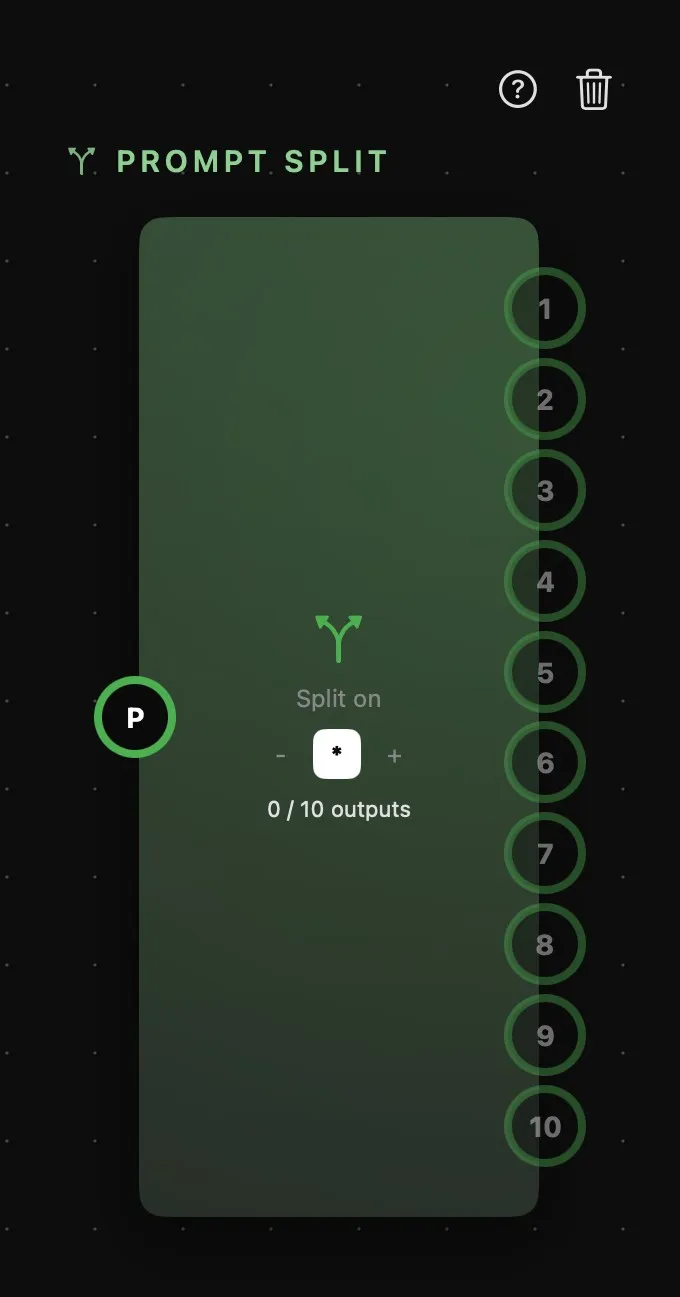
| Area | What it does |
|---|---|
| Above the card | The card’s name, then help and delete. |
| Split on | The separator: -, * or +. It starts on *. |
| Outputs | How many parts the prompt makes, out of ten. It updates as the upstream text changes. |
| P | The prompt to split, on the left: a Prompt Text, a Prompt card, a Prompt Concat, or a Workflow’s prompt. |
| 12 | The outputs, on the right: always ten rings, 1 to 10, one per part, in the order they appear in the text. |
More on rings in How nodes connect.
How it splits
The text is written somewhere else and wired in: there’s nothing to type on the card. Put your prompts in a Prompt Text, separated by lines holding just a -, * or +, and wire it into the P ring. The card splits at those lines — ring 1 carries the first part, ring 2 the second, and so on. Wire each ring to its own generator.
It only splits at a line that holds nothing but the separator, spaces around it aside, so a prompt full of bullet points or hyphenated words passes through untouched. Empty parts are left out, and a prompt that makes more than ten keeps the first ten.
All ten output rings are always there. The ones the prompt doesn’t reach are dimmed, but you can still wire them in advance — they start carrying text as soon as the prompt grows a part for them. A generator fed by a Split says which part it’s getting: From the Prompt Split card, part 3.
With a Prompt card
A Prompt card can already write several prompts at once, each on a numbered output of its own — that’s the quicker route when a language model is writing them. Reach for a Split when the text is one you wrote yourself, in a Prompt Text, and you want to keep it in one place while sending each part somewhere different.